
Account Security
Binance Password Bhool Gaye To Kaise Reset Karein? Passkey Popup Aur 24 Ghante Ki Pabandi
Binance ka password yaad na rahe to account daalne ke baad [Forgot password?] wala raasta chalta hai, lekin passkey wale account ko pehle popup cancel karna parta hai. Reset ke baad 24 ghante withdrawal, P2P selling, payment services aur internal transfer band rehte hain. Yahan official guide ke mutabiq poore steps, password ke rules, code na aane ka hal aur 2FA device bhi na hone ki surat ka raasta diya gaya hai.
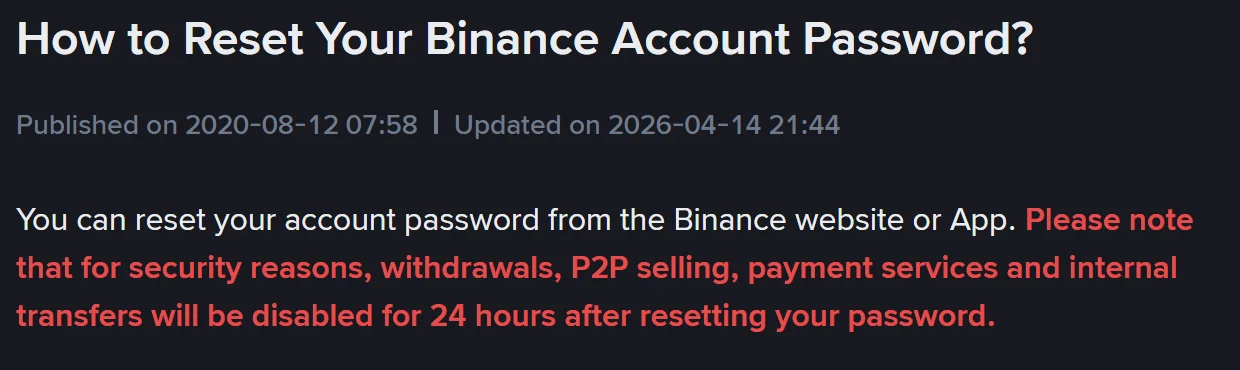
Binance par login karte waqt password baar baar ghalat aa raha hai to sab se tez raasta dobara dobara type karna nahi hai. Account ka email ya phone number daalne ke baad flow ko [Forgot password?] ki taraf mor dena hota hai. Yeh raasta official hai aur website aur App dono par mukammal hota hai, lekin do baatein pehle se jaan lena behtar hai: reset mukammal hone ke baad 24 ghante tak withdrawal, P2P selling aur payment services band rehti hain, aur agar aap ke paas 2FA device bhi nahi hai to password reset ka flow beech mein hi ruk jata hai — phir ek alag procedure chalani parti hai.
Neeche Binance ke apne English guide aur asli reset page ke mutabiq tarteeb, atakne ki jagahain aur intezaar ka waqt tafseel se diya gaya hai.
Pehle yeh tay karein: aap bhool gaye hain ya kisi aur ne account chhua hai
Agar password achanak kaam karna band kar de aur sath hi aise login ya withdrawal ke notification aa rahe hon jo aap ne khud shuru nahi kiye, to yeh password bhoolne ka masla nahi hai. Aisi surat mein pehla qadam account disable karna hai, password badalna nahi — tarteeb ulat ho jaye to password badalne ke chand minute mein hi asset bahar ja sakta hai. Is surat ka poora tareeqa Binance account par ajnabi login ho to pehle kya karein mein likha hai.
Agar aap ko yaqeen hai ke sirf password yaad nahi raha, to aage barhein.
Website aur App par reset ke steps
Binance ke guide "How to Reset Your Binance Account Password?" ke mutabiq tarteeb yeh hai:
- Binance.com par ja kar [Log In] par click karein; App mein [Sign Up / Log In] par tap karein.
- Account ka email ya phone number daal kar [Next] par click karein.
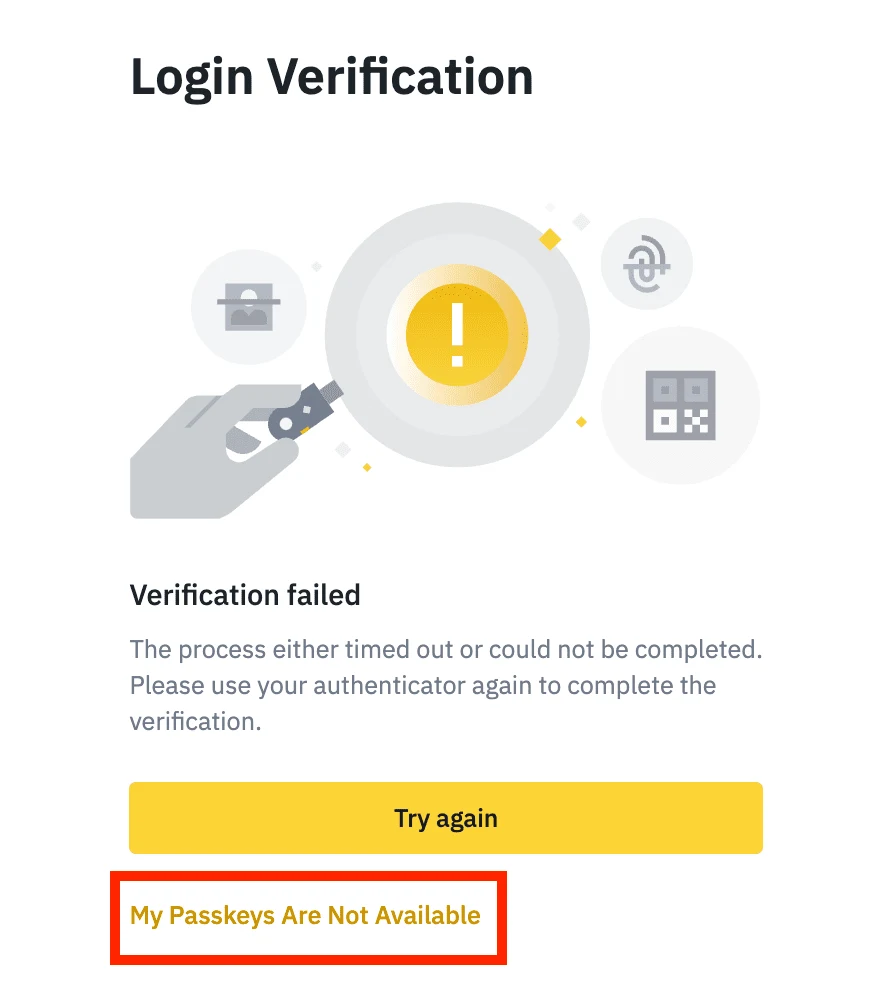
- Agar account par passkey enabled hai to pehle passkey se verify karne ko kaha jayega. [Cancel] par click karein aur [My Passkeys Are Not Available] chunein — is ke baad hi [Forgot password?] nazar aata hai.
- Notes parh kar [Continue] par click karein.
- Security verification mukammal karein (email, SMS ya authenticator).
- Naya password daal kar [Confirm] par click karein.
- Naye password se login karein.
Teesra qadam wahi jagah hai jahan zyada log atakte hain. Passkey wale account ko login page seedha "Forgot password?" nahi deta; pehle passkey ka popup cancel karna parta hai.
Naye password ke rules aur reset page par kya likha hota hai
Guide mein likha hai ke password mein kam az kam 8 characters, 1 number aur 1 upper-case letter hona chahiye. Asli reset page is se ek baat zyada batata hai: upper limit 128 characters hai.
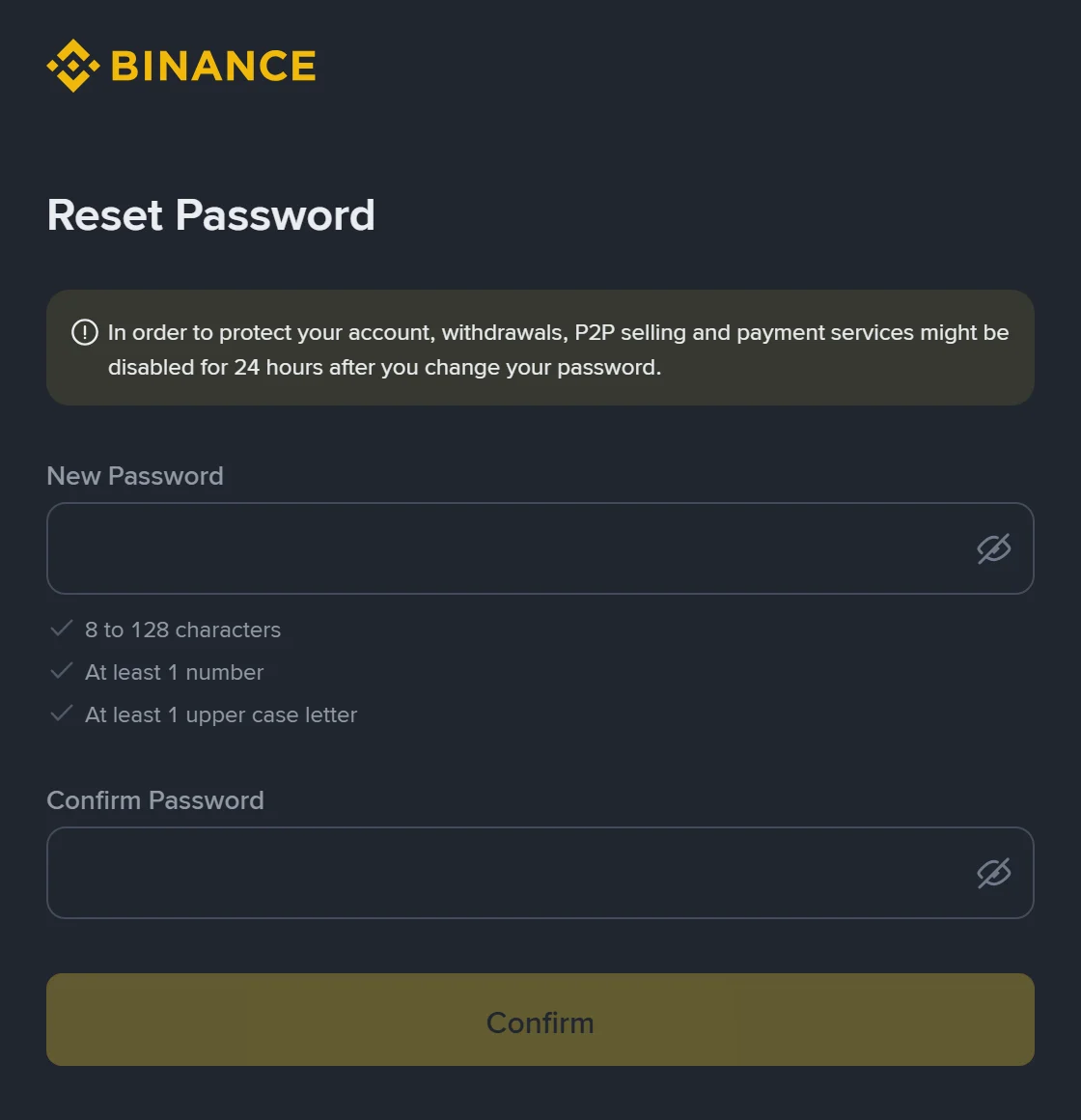
Aam nakami ki do wajuhat yahi hoti hain: poora password chhote hurf mein likh dena, ya sirf symbols aur hurf daal kar number chhor dena.
Reset ke baad 24 ghante kya band rehta hai
Yeh wo baat hai jo pehle se plan karni chahiye. Guide ka jumla hai: security reasons ki wajah se password reset karne ke baad withdrawals, P2P selling, payment services aur internal transfers 24 ghante ke liye band rahengi.
Dhyan dene wali baat yeh hai ke asli reset page ka notice box thora mukhtalif likhta hai: "withdrawals, P2P selling and payment services might be disabled for 24 hours" — is mein internal transfers shamil nahi aur lehja bhi "might be" ka hai. Jab do jagah alfaz poori tarah milte na hon to mehfooz tareeqa yeh hai ke bara daira maan kar chalein: withdrawal, P2P sell, payment services aur apne accounts ke darmiyan internal transfer — charon 24 ghante ke liye band samjhein.
Dusri taraf, yeh 24 ghante sirf asset bahar nikalne wale kaam rokte hain. Deposit aur spot buy/sell is list mein nahi hain. Agar in dinon mein paisa nikalna hi hai to behtar hai pehle withdrawal nipta lein, phir password badlein. App mein [Account Center] se khud password badalne par bhi yahi 24 ghante lagte hain.
Security verification par atak gaye: code nahi aa raha
Paanchwein qadam par verification code zaroori hai; code na aaye to flow aage nahi barhta. Binance ke guides mein suratein alag alag hain:
- SMS code nahi aa raha: pehle signal dekhein, phone par anti-virus, firewall ya call blocker app arzi tor par band karein, phir phone restart karein; is ke baad bhi na aaye to voice verification try karein. Yahan Pakistan ke users ke liye ek baat saaf hai: Binance ki SMS coverage list mein Pakistan (PK, country code 92) shamil hai (list 2026-02-23 ko update hui), yani masla mulk ki coverage ka nahi balki apne phone, network ya blocking app ka hai. Jin mulkon ka naam us list mein nahi, un ke liye official mashwara passkey, BAuthenticator ya Google Authenticator ko primary 2FA banana hai.
- Email code nahi aa raha: spam aur trash folder dekhein, kyunki email provider verification mail delete kar sakta hai; zyada traffic ke waqt mein deri bhi hoti hai, is liye official mashwara 10 minute baad dobara koshish karne ka hai.
- Apple ID se sign up kiya tha aur "Hide My Email" on tha: code us Apple relay address par jata hai jo sign up ke waqt bana tha, profile par nazar aane wale email par nahi. Apple device ke [Settings] mein apni Apple ID khol kar [Sign-In & Security] se asal address mil jata hai.
- Code to aa raha hai lekin "Wrong code" likhta hai: [Get Code] se naya code lein, magar thori der mein baar baar click na karein — official guide mein likha hai ke is se account lock ho sakta hai. Dusra device ya dusra network bhi try karein, masalan App ke bajaye computer ka browser, ya Wi-Fi ke bajaye mobile data.
Agar 2FA device bhi hath mein nahi
Agar email, SMS aur authenticator teeno band hain to password reset security verification par hi ruk jayega. Official guide is surat mein 2FA reset ka alag flow deta hai: login page par account daalne ke baad "Security Verification Requirements" safhe par wo tareeqa chunein jo is waqt available nahi, [Security verification unavailable?] par click karein, phir un tamam devices par nishan lagayein jo aap ke paas nahi aur [Confirm Reset] karein.
Is raaste ka intezaar password reset se lamba hai: 2FA devices reset karne ke baad withdrawal, P2P selling, internal transfer aur payment services zyada se zyada 48 ghante band rehti hain. Agar request ka status [Under Review] dikhaye to official text ke mutabiq review mein 24 ghante tak lag sakte hain, aur nateeja naye verified email par bheja jata hai. Agar ek verification method abhi bhi chal raha ho to poora set reset karne mein jaldi na karein — tafseel aur phone gum hone ki surat Phone gum ho jaye to Binance 2FA kaise reset karein mein hai.
Password badalne ke baad teen kaam
- Login devices check karein: security page par wo devices logout kar dein jo aap ke nahi, warna purana login session chalta reh sakta hai.
- Email aur phone number apna hi hai, yeh confirm karein: jin accounts ko chheta gaya ho un mein attacker aksar pehle binding badalta hai. Lekin yaad rahe ke email ya number badalne ka apna protection period hai aur wo password wale 24 ghante se alag hai — tafseel Email ya phone number badalne ke baad withdrawal kitni der band rehti hai mein hai.
- Naya password kisi aur exchange ya email ke sath share na karein: password leak aksar exchange se shuru nahi hota, kisi purane account se credential chori ho kar yahan try kiya jata hai.
Official sources
- Binance guide "How to Reset Your Binance Account Password?" (Updated on 2026-04-14): reset ke steps aur 24 ghante ki pabandi
- Binance guide "How to Reset 2FA When I Can't Access My Binance Account?" (Updated on 2026-03-18): 48 ghante ki pabandi aur review ka waqt
- Binance guide "How to Resolve 2FA Code Error for My Binance Account?": code na milne ki troubleshooting
- Binance guide "Why Can't I Receive SMS Verification Codes?": SMS coverage aur metbadil verification
- Binance list "Supported Countries for SMS Verification on Binance" (Updated on 2026-02-23): mulkon ki poori list, Pakistan PK 92 shamil
Upar diye gaye official safhat aur screenshots 2026-10-12 ko check kiye gaye. Screenshots bina login ke liye gaye hain, is liye un mein koi zaati maloomat nahi. Binance ka interface aur rules badal sakte hain, is liye amal karne se pehle apne account mein nazar aane wale notice ko hi akhri samjhein. Yeh site Binance ki official site nahi, ek azad guide site hai.