
Account Security
Binance account par ajnabi login? Pehle account disable karein, password baad mein
Agar Binance account par ajnabi login ya aisi withdrawal nazar aaye jo aap ne nahi ki, to official pehla qadam password badalna nahi balke account disable karna hai. Is guide mein official help pages ke mutabiq: kaun si cheezein suspicious activity hain, App aur website se disable karne ke steps, password reset ke baad 24 ghante kya band rehta hai, aur video verification se account unlock karwane ke liye kya tayyar karna hai.
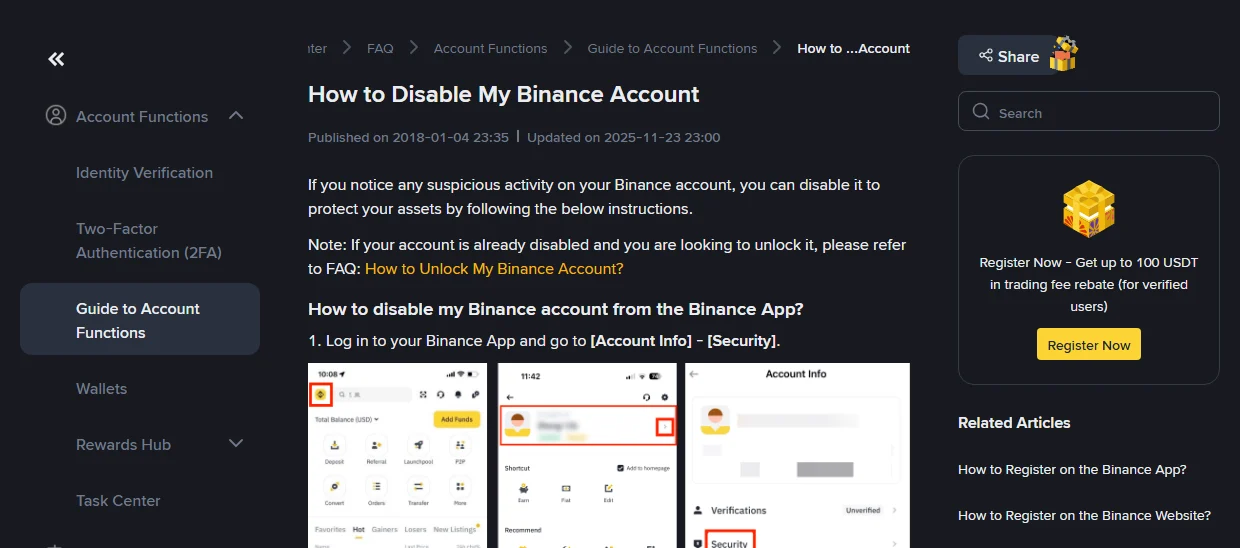
Upar wali tasveer Binance ke official English help page "How to Disable My Binance Account" ki hai. Page par Published on 2018-01-04 aur Updated on 2025-11-23 likha hai, aur humne ise 2026-09-25 ko check kiya. Page ki pehli line hi tarteeb saaf kar deti hai: agar account par koi mashkook activity nazar aaye, to pehle account disable karo taake assets mehfooz rahein.
Zyada tar log jab dekhte hain ke account theek nahi lag raha, to sab se pehle password badalne bhaagte hain. Neeyat sahi hai, lekin tarteeb ghalat hai. Password reset karne mein verification, email aur link click karna lagta hai — aur us poore waqt dosra banda andar mojood rehta hai. Binance ka official pehla qadam yeh hai ke poora account hi disable kar do, yaani darwaza band kar do. Is article mein "masla nazar aane se le kar account wapas milne tak" ka poora silsila tarteeb se, har qadam ke saath official page ka asal matan.
Binance kis cheez ko "suspicious activity" kehta hai
Binance ke "Binance Account Security Tips" page par ek sawal-jawab hai jo asaamaanya (abnormal) surat-e-haal ki list deta hai. Yehi list faisla karne ke liye sab se kaam ki hai ke account disable karna chahiye ya nahi.
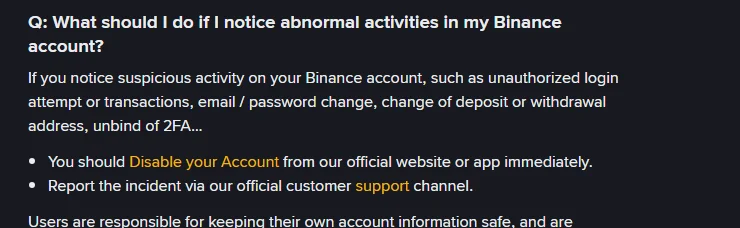
Page par jo surat-e-haal likhi hain: "unauthorized login attempt or transactions, email / password change, change of deposit or withdrawal address, unbind of 2FA…". Is ke baad do kaam diye gaye hain, aur in ki tarteeb tay shuda hai:
You should Disable your Account from our official website or app immediately.
Report the incident via our official customer support channel.
Amli tor par kuch aur ishaare bhi isi list mein aate hain: aisa verification code SMS ya email jo aap ne mangwaya hi nahi, login par 2FA binding badli hui milna, withdrawal address book mein aisa address jo aap ne add nahi kiya, ya "new device login" ka notification jo aap nahi thay.
Agar aap sirf yeh confirm karna chahte hain ke pichhla login aap ka tha ya nahi, to isi page par likha hai: "Monitor your account activity for any unauthorized operations. Binance provides a record of all login attempts and operations." Login record aur device list account ki security settings mein hain — inhein dekhne ke liye login zaroori hai.
Pehla qadam: account disable karein
Account disable karna poore account ke operations rok deta hai — yeh account delete karna nahi hai, assets apni jagah rehte hain. Official page do raaste deta hai:
Binance App
- Binance App mein login kar ke [Account Info] – [Security] par jaayein.
- Neeche scroll kar ke [Manage Account] – [Disable Account] par tap karein.
- Hidayaat ghaur se parh kar [Disable Account] dabaayein aur tamaam security verifications mukammal karein.
Binance website
- Account mein login kar ke profile icon par click karein, phir [Account], aur side menu mein [Security].
- Neeche "Account Management" – "Disable Account" tak scroll kar ke [Disable] button dabaayein.
- Hidayaat parh kar [Disable This Account] par click karein aur security verification mukammal karein.
Dono raaston ke aakhir mein security verification aati hai. Yahan ek amli masla hai: agar dosre banday ne 2FA unbind kar di ya apni bind kar li hai, to shayad aap disable bhi na kar payein — us surat mein seedha agle qadam par jaayein aur support channel se raabta karein.
Dusra qadam: official support channel par report karein
Disable karne ke baad waqia report karna official jawab ka doosra hissa hai. Iska maqsad sirf madad maangna nahi, waqt ka record chhorna bhi hai. Yeh maloomat pehle se tayyar rakhein: masla kab nazar aaya, kya dekha (kaun si withdrawal, kaun sa address, kaun sa login), aur account ka registered email.
Isi page par likhi yeh baat khaas tor par yaad rakhein: "Binance will never call you or send you a message on Whatsapp or other social media." Account par masla hone ke baad doosri dafa dhoka khaane ka khatra sab se zyada hota hai — kai logon ko disable karte hi "Binance support" ban kar call aati hai ke hum account "unfreeze" karwa dete hain. Asli support sirf official website ya App ke support channel mein hai. Agar aap ko abhi tak nahi pata ke asli Binance email kaisi hoti hai, to pehle anti-phishing code set karne ka tareeqa dekh lein — is ke baad har asli email par aap ka apna chuna hua code aayega.
Teesra qadam: password reset karein, aur jaanein kya lock hoga
Account ka control wapas milne ke baad (ya agar aap bahar hue hi nahi, sirf ajnabi login record dekha hai) password zaroor badlein. Lekin pehle yeh jaan lein ke badalne ke baad kya hota hai.
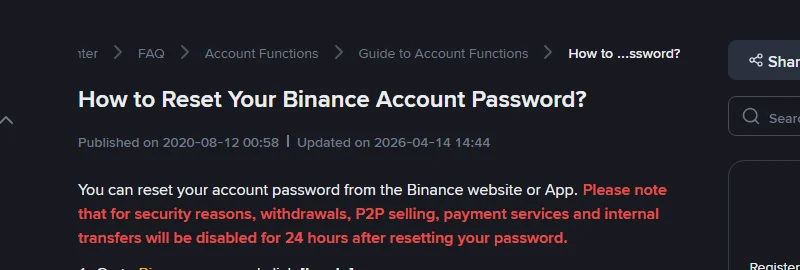
Page laal rang mein likhta hai: "for security reasons, withdrawals, P2P selling, payment services and internal transfers will be disabled for 24 hours after resetting your password."
Yeh 24 ghante dono taraf kaam karte hain. Hamlaawar ke liye: naya password mil bhi jaaye to assets nahi nikaal sakta. Aap ke liye: is arse mein aap khud bhi withdraw nahi kar sakte. Is liye agar assets ko foran khatra lag raha ho, to pehla kaam phir bhi account disable karna hai, password badalna nahi — password reset sirf withdrawal rokta hai, disable poora account rok deta hai.
Naye password ka qaida bhi page par hai: kam az kam 8 characters, 1 number aur 1 capital letter. Agar aap ne passkey enable ki hui hai to reset ke waqt pehle passkey maangi jayegi; na chale to [Cancel] dabaa kar [I cannot use my passkey] chunein aur koi doosra 2FA device istemal karein. Agar koi bhi 2FA device dastyab na ho to mobile gum hone par authenticator reset karne ka tareeqa follow karna parta hai.
Disable karne ke baad account wapas kaise milta hai
Disable karna aakhri manzil nahi. Account unlock karwane ke liye video verification deni parti hai, jis ka alag official page mojood hai.
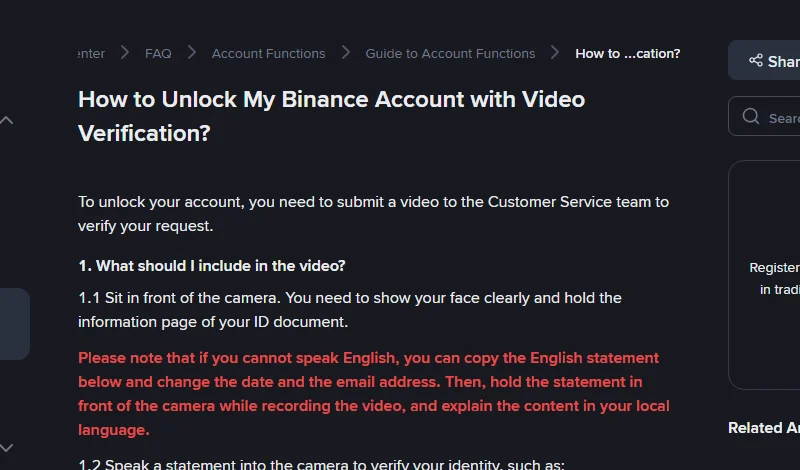
Video mein yeh cheezein zaroori hain, page ne list bana kar di hai:
- Aaj ki tareekh
- Aap ki darkhwast
- Saaf tor par tasdeeq ke aap ne khud yeh amal authorize kiya
- Aap ke maqsad ka bayan
- Aap ke Binance account ka email address
Record karte waqt camera ke saamne baithna hai, chehra saaf dikhna chahiye, aur ID document ka information page haath mein hona chahiye. Page ka misaali jumla: "Today is [date], I am applying to unlock my account. I confirm this is me performing this action and I want to contact Binance customer service to unlock my Binance account [email protected]." Jo log English nahi bol sakte, woh page par diya gaya English bayan copy kar ke us mein apni tareekh aur email daal sakte hain, phir record karte waqt woh bayan camera ke saamne pakar kar apni zaban mein us ka matlab bata sakte hain.
Do baatein aksar nazar andaz ho jaati hain: video par watermark nahi lagana aur edit nahi karna; aur video ke saath wahi ID document ki tasveer bhi jama karni hai jo aap ne video mein dikhayi. Kuch users se account ki registration date aur registration IP bhi poochi jaati hai — yeh dono purani registration confirmation email mein milte hain. Woh email pehle dhoond lena review tez kar deta hai.
Is page par koi published ya updated tareekh darj nahi hai; humne ise 2026-09-25 ko check kiya.
Account wapas milne ke baad paanch kaam
Access wapas mil jaana sirf khoon rokna hai; asal kaam yeh hai ke dobara andar aane ka raasta band ho. "Binance Account Security Tips" page ki hidayaat amli tarteeb mein:
- Email ka password badlein aur email par 2FA on karein. Page email ko account tak pohanchne ka ahem darwaza qarar deta hai — sirf exchange ka password badalna aur email chhorna kaafi nahi.
- 2FA naye sire se set karein. Page ki hidayat hai ke SMS verification ke mutabadil ke tor par passkey ya authenticator App istemal karein; SMS sab se mazboot parat nahi.
- API keys saaf karein. Asal matan: "Remove all unused or unnecessary API access. Do not add any API keys if you are unsure of their purpose." Hack shuda account mein sab se aam pichhla darwaza ek zinda API key hoti hai, jise dobara login ki zaroorat bhi nahi parti.
- Withdrawal address whitelist on karein. On karne ke baad sirf list mein maujood addresses par hi withdrawal ho sakti hai — poora tareeqa withdrawal whitelist set karne ki guide mein hai.
- Device aur browser check karein. Page kehta hai ke device ko regular scan karein aur sirf official source se apps install karein, aur yeh bhi ke web par account use karte waqt browser extensions se guraiz karein. Agar shak ho ke device hi mutasir hai, to kisi saaf device se login karein.
Do cheezein jo alag hain
Disable karna delete karna nahi hai. Disable freeze hai — assets rehte hain aur baad mein video verification se unlock ho sakta hai; account delete karna alag feature aur alag page hai, jo wapas nahi hota. Emergency mein "Disable" hi dabana hai.
Account suspension bhi disable nahi hai. "Account suspended" ka notification Binance ki taraf se lagayi gayi pabandi hai; is ki wajah aur hal aap ke apne disable karne se bilkul mukhtalif hai — dono ko mat milaayein.
Official maloomat ke sources
- Binance help page How to Disable My Binance Account (page par Published 2018-01-04, Updated 2025-11-23; hamara check 2026-09-25)
- Binance help page Binance Account Security Tips (page par Published 2018-01-18, koi updated tareekh nahi; hamara check 2026-09-25)
- Binance help page How to Reset Your Binance Account Password? (page par Published 2020-08-12, Updated 2026-04-14; hamara check 2026-09-25)
- Binance help page How to Unlock My Binance Account with Video Verification? (page par koi tareekh nahi; hamara check 2026-09-25)
Yeh website Binance ki official website nahi, ek azaad third-party learning site hai. Interface ke alfaaz aur steps version ke saath badal sakte hain — amal karne se pehle apne account ki asal screen aur upar diye official pages dekh lein.